5. When the factory needs you
By the end of this chapter you will know what to do each time the factory stops and waits for you.
When the factory needs you, it says so on the issue, and the room list marks the task needs you.
You answer with a label, a review, or a comment starting with /factory. Other comments are not read.
The hand-off
When the agents have done what they can, the factory hands off the task to you. It comments on the issue once, with the reason and one thing to do. Most of the time that is: approve the pull request, and the merge bot merges it.
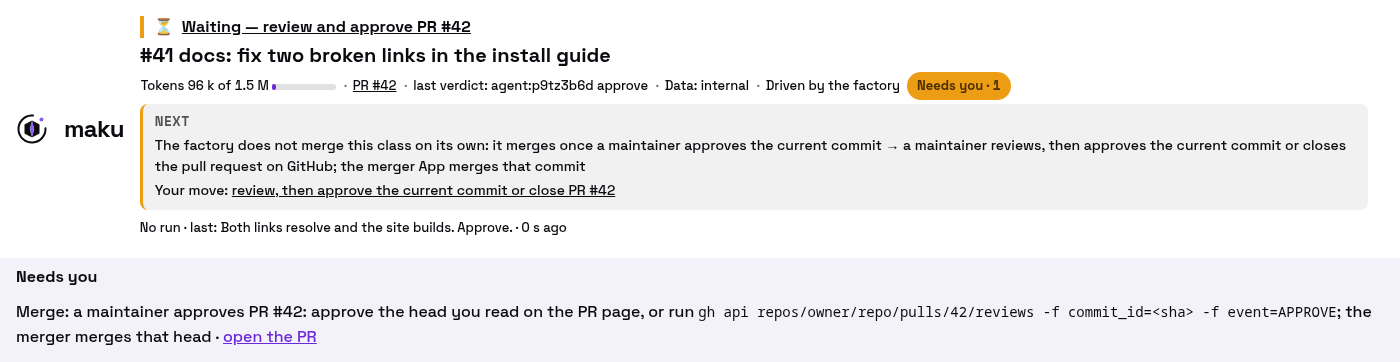
A room after a hand-off. Needs you names your one move: approve the commit you read, and the merge bot merges it.
The bot follows the factory’s merge gate: its rules for what may merge, and when. Each hand-off carries a reason code. The four you will meet most:
| Reason | What it means | What you do |
|---|---|---|
class_unarmed | This kind of change never merges on its own | Review it; approve to merge, or request changes |
policy_pending | The merge gate waits for a maintainer | Approve the latest commit |
approval_stale | Your approval was of an older commit, or came while an agent was still pushing | Approve again |
human_commit_in_pr | A person pushed a commit to the agent’s branch | Read that commit, then have an admin merge it, or close the pull request |
The last row happens when someone pushes a fix to the agent’s branch by hand. The merge bot merges only
what the agents pushed, so a repository admin merges it instead, with gh pr merge --admin.
Will your change merge on its own, with no approval? Only if its class is live: see when a pull request merges and the status page’s class modes.
Want the detail? See when a pull request merges, every hand-off reason and the gate’s checks.
Approve the commit you read
GitHub attaches an approval to the latest commit when it arrives. If an agent pushes while you read, a command-line approval can approve a commit you never saw.
So wait until the room shows no run in progress, then approve from GitHub’s web page. From a terminal, name the commit:
gh api repos/<owner>/<repo>/pulls/<number>/reviews -f commit_id=<sha> -f event=APPROVEThe factory asks a question
For some classes, a first agent, the scoper, reads your issue before anyone writes code. When the
issue leaves something open, it asks instead of guessing: it comments its question and the assumption it
would make, and labels the issue factory/needs-author.
- To answer, edit the issue, then remove
factory/readyand put it back. A reply comment changes nothing. - To go ahead on its assumption, comment
/factory retry. - If you do nothing, the task stops after 7 days.
The factory proposes a split
A big issue may come back with a plan instead: two to four parts, each with its own acceptance check,
and the label factory/split-proposed.
- To accept the plan, comment
/factory split. Every part’s cost counts toward your own spending total. - To run it as one task anyway, comment
/factory retry. - To change the plan, edit the issue, then remove
factory/readyand put it back.
The parts then open one at a time, as sub-issues, each with its own pull request. The parent issue closes after the last one merges.
Next: chapter 6 brings all of this to your terminal and your coding agent.